Nexora TableالجدولData Table
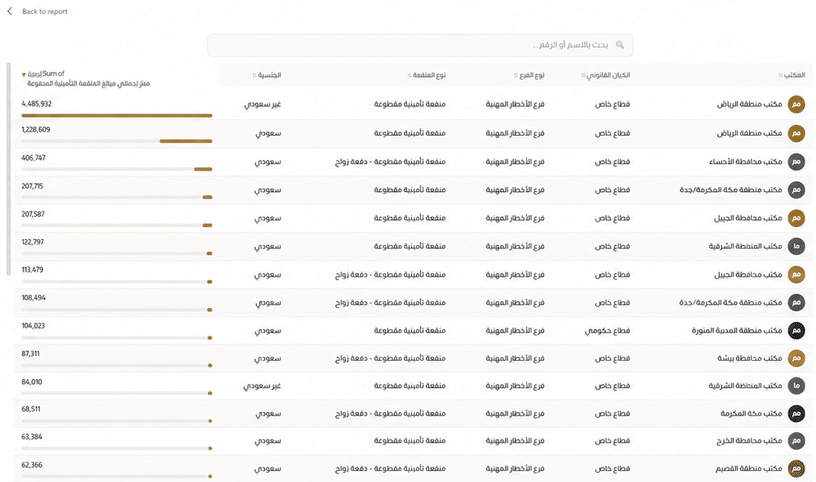
جدول بيانات متقدم يسهّل قراءة التفاصيل، مع خريطة حرارية داخل الخلايا، ومخططات مصغرة، وبحث، وتثبيت للعمود الأول.A premium Arabic-first data table with a cell heatmap, a sparkline column, and a frozen first column.
- خريطة حرارية بلوني حد أدنى وأعلىCell heatmap with min/max colours
- بحث داخل الجدولIn-table search with adjustable position and width
- تنسيق مستقل للأرقام والنسب والعملات في كل عمودPer-column number formatting (percent / currency / Riyal)
ما الذي تضيفه الأداة؟The problem it solves
لماذا الجدول؟Why Data Table?
الجداول التقليدية تعرض التفاصيل، لكنها لا تساعد دائمًا على اكتشاف النمط. يضيف Nexora Table إبرازًا بصريًا وتنسيقًا لكل عمود، حتى تظهر القيم الأعلى والأدنى ويصبح الوصول إلى السجل المطلوب أسرع.Default tables show numbers without surfacing patterns. Nexora Table turns your rows into a calm, readable grid with conditional emphasis, per-column formatting, and instant high/low reading.
متى تناسبك؟When to use it
التقارير المالية والتشغيلية التفصيليةDetailed financial and operational reports
مقارنة السجلات جنبًا إلى جنبComparing records side by side
جداول الموارد البشرية والمبيعاتHR and sales tables
عرض بيانات كبيرة مع بحث وتصفيةRendering up to 30,000 rows smoothly
المزايا والإعداداتFeatures & settings
المزايا الرئيسيةKey features
الخصائص التالية متاحة ضمن إعدادات الأداة داخل Power BI.Every feature is taken from the visual’s actual settings.
العرض والقراءةDisplay & reading
- خريطة حرارية بلوني حد أدنى وأعلىCell heatmap with min/max colours
- مخطط مصغّر لكل صفCompact sparkline column per row
- تثبيت العمود الأول أثناء التمريرFrozen first column with a shadow on scroll
- صفوف متناوبة وخطوط شبكة قابلة للتعديلStriped rows and adjustable gridlines
- فواصل اختيارية بين أعمدة العناوينOptional dividers between header columns
التفاعلInteraction
- بحث داخل الجدولIn-table search with adjustable position and width
- تحديد الصف والتصفية المتقاطعةRow selection and two-way cross-filtering
- لون تحديد قابل للتخصيص مع أنيميشن اختيارCustomizable selection colour with a subtle selection animation
- لون إبراز قابل للتخصيص عند المرورCustomizable hover highlight colour
- دعم RTL وLTR والوضع التلقائيTable direction: RTL / LTR / Auto
- حد ذكي يصل إلى 30,000 صفSmart cap up to 30,000 rows
التنسيقFormatting
- تنسيق مستقل للأرقام والنسب والعملات في كل عمودPer-column number formatting (percent / currency / Riyal)
- أشرطة تقدم داخل الخلاياIn-cell progress bars
- تلوين شرطي بحسب حدود تحددهاConditional number colouring by threshold
- تحكم كامل في العنوان والخطوطTitle with an accent word and full font control
خطوة بخطوةStep by step
طريقة الإعدادHow to use
أضف الأداة إلى الصفحةImport the visual and add it to the page
اسحب الأعمدة والمقاييس إلى ColumnsDrag your columns and measures onto Columns
رتب الحقول بحسب أولوية القراءةOrder the columns as you want them in the table
فعّل الخريطة الحرارية أو المخطط المصغّر عند الحاجةEnable the heatmap or sparkline as needed
اضبط تنسيق كل عمودSet each column’s format and the font
فعّل البحث وتثبيت العمود الأول ثم انشرEnable search and freezing, then publish
مثال تطبيقيA practical example
سيناريو: التقارير المالية والتشغيلية التفصيلية.Scenario: Detailed financial and operational reports.
اربط الحقول المطلوبة (Columns) لتحصل على الجدول جاهزة بهوية نيكسورا.Bind the required fields (Columns) to get a ready Data Table in the Nexora identity. القيم الظاهرة في الأمثلة توضيحية فقط.* Display numbers are illustrative.
الحقولFields
الحقول المطلوبةData requirements
أضف الحقول التالية إلى لوحة الحقول في Power BI.The fields you place in the field well inside Power BI.
| الدور (Field well)Role (Field well) | النوعType | الإلزامRequired | الوظيفةPurpose |
|---|---|---|---|
| Columns — الأعمدة والمقاييسColumns | تصنيف/مقياسCategory/Measure | مطلوبRequired | حتى 12 حقلًا (تصنيفات ومقاييس)Up to 12 fields (categories and measures) |
لوحة الحقولField well
استخدام أفضلQuality
نصائح الاستخدام وما يُتجنّبBest practices & common mistakes
نصائح الاستخدامBest practices
- رتب الأعمدة من الأهم بدءًا من اليمينOrder columns from most important first
- طبّق الخريطة الحرارية على مقياس واحد أو اثنين فقطUse the heatmap on a single measure column, not all
- ثبّت عمود الاسم أو المعرّفFreeze the identity column (name) for reading while scrolling
- قلل عدد الأعمدة بما يناسب عرض الصفحةLimit the number of columns to fit the screen width
تجنّبAvoid
- ✕ عرض عدد كبير من الأعمدة في مساحة ضيقةShowing too many columns breaks readability
- ✕ تطبيق الخريطة الحرارية على كل الأعمدةEnabling the heatmap on every column
- ✕ ترك الأرقام بتنسيقات مختلفةLeaving numbers without a unified format
- ✕ عدم تثبيت العمود الأول في الجداول الواسعةNeglecting to freeze the first column in wide tables
أسئلةQuestions
الأسئلة الشائعةFAQ
كم صفًا يدعم؟How many rows can it handle?+
هل يدعم التصفية المتقاطعة؟Does it support cross-filtering?+
كيف يعمل الترخيص؟Does it need a licence?+
جرّب Nexora TableReady to try Data Table?
جرّب الأداة، أو اطلب لوحة Power BI مخصصة باستخدام أدوات نيكسورا.Start your trial or use it inside a custom dashboard.